To organize our project, we use a series of spreadsheets. Our spreadsheet templates provide a consistent system for managing tasks, tracking progress, and monitoring team performance across the MANTIS project. They are designed to keep work visible, accountability clear, and leadership informed during weekly operations.
Task Data sheet
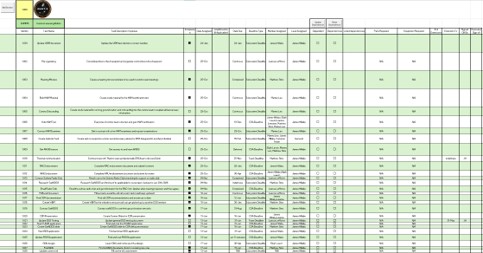
This sheet is where all tasks for the team are laid out. It shows the task ID, name, status, date assigned, due date, member(s) assigned, dependencies, and a brief description of what the task is. This sheet also acts as a look-up to see who is doing what each week, and if they completed their tasks from previous weeks. Furthermore, tasks are ordered by subsystem, with the COMMs licensing sheet shown to the right.
Task management & Weekly Updates
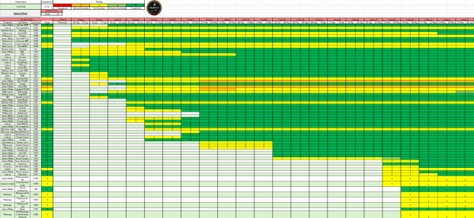
This sheet is known as the task tracker for the team.Also split up by subsystem,this sheet provides a weekly status update sheet so subsystem leads and members can monitor progress in one place. Additionally, the colors and numbers give a visual scale of whether a task is on track, behind track, or completed. Ultimately, thissheet keeps the entire project aligned by providing a single progress source for ongoing work.
Member Analytics
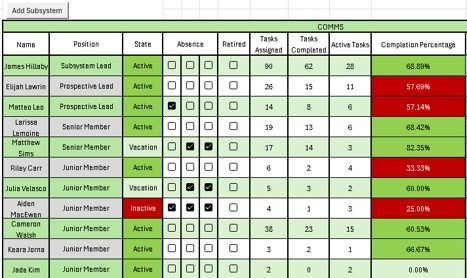
The member analytics sheet is used to track participation, members taking breaks from the project, tasks per member, and contribution levels across the team. It helps leaders recognize strong contributors andidentify members who need support or re-engagement.Status indicators, such as attendance,quickly highlight active inactive participation patterns. As well as member analytics, this sheet also provides contact information for members. Overall, this sheet supports team members and shows who is contributing the mostacross MANTIS.
TEAM MEMBERS
STATUS
COMPLETION PERCENTAGE
Team Roles
Provides strategic leadership and oversight for the M.A.N.T.I.S. mission, ensuring all project activities align with mission objectives, timelines, and stakeholder expectations. The Mission Director facilitates collaboration across teams and represents the project to external partners and organizations.
MISSION DIRECTOR
Oversees system-level design and integration across all subsystems, ensuring requirements are properly defined, interfaces are managed, and mission objectives are met. The Systems Engineer coordinates verification and testing activities to maintain a cohesive and reliable spacecraft architecture.
SYSTEMS ENGINEERS
Leads the development, integration, and testing of a designated subsystem. Responsible for technical direction, task delegation, and ensuring subsystem deliverables are completed on schedule while maintaining communication with project leadership.
SUBSYSTEM LEADS
Assists the Subsystem Lead in managing technical development and team operations. The Co-Lead supports project planning, facilitates collaboration among team members, and helps ensure subsystem objectives are achieved.
SUBSYSTEM CO-LEADS
Contributes advanced technical expertise and project experience to support subsystem development and mission success. Senior Members mentor junior team members, lead technical tasks, and play a key role in design reviews and testing activities.
SENIOR MEMBERS
Actively contributes to subsystem tasks while developing technical and professional skills through hands-on project experience. Junior Members work closely with senior team members and participate in design, analysis, testing, and documentation activities.
JUNIOR MEMBERS
Individuals interested in joining M.A.N.T.I.S. who are exploring project opportunities and gaining familiarity with team operations. Prospective Members participate in onboarding activities and learn about the mission, technologies, and engineering processes used by the team.
PROSPECTIVE MEMBERS
Previous
Next
Subsystem Analytics & Member Lookup
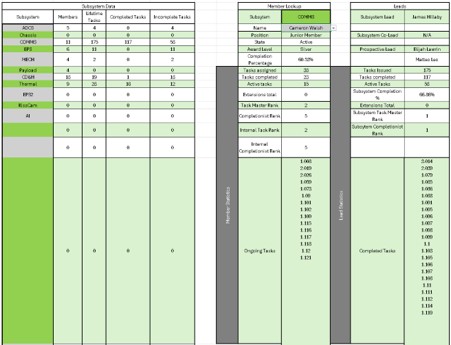
This sheet provides an overview of progress within each subsystem. It shows task data, completion rates, and workload so leadership can evaluate projectmomentum across DSS and make sure all subsystems have balanced work.By consolidating subsystem performance into one view, this helps leadership make informed decisions and keep the project moving forward efficiently. Furthermore, leads and members can use this sheet to look up their tasks and to see their rank within the project. Once members see what tasks they have assigned, they can use the task data sheet to gain a description of the task and to see who to ask for help if issues arise.
Why These Spreadsheets Matter
Together, these sheets create a structured workflow for managing our project. They improve communication, increase accountability, and provide the visibility needed to coordinate several subsystems and contributors effectively.